 CIC
CIC
Report(7) Captured from 10-03-2018 to 23-03-2018
1-Introduction
The first honeypot studies released by Clifford Stoll in 1990, and from April 2008 the Canadian Honeynet chapter was founded at the University of New Brunswick, NB, Canada. UNB is a member of the Honeynet Project, an international non-profit security research organization.
In computer terminology, a honeypot is a trap set to detect, deflect or in some manner counteract attempts at unauthorized use of information systems. Generally, honeypots essentially turn the tables for Hackers and Computer Security Experts. They consist of a computer, data or a network site that appears to be part of a network, but is isolated, and seems to contain information or a resource that would be of value to attackers.
There are some benefits of having a honeypot:
• Observe hackers in action and learn about their behavior
• Gather intelligence on attack vectors, malware, and exploits. Use that intel to train your IT staff
• Create profiles of hackers that are trying to gain access to your systems
• Improve your security posture
• Waste hackers’ time and resources
• Reduced False Positive
• Cost Effective
Our primary objectives are to gain insight into the security threats, vulnerabilities and behavior of the attackers, investigate tactics and practices of the hacker community and share learned lessons with the IT community, appropriate forums in academia and law enforcement in Canada. So, CIC decided to use cutting edge technology to collect a dataset for Honeynet which includes honeypots on the inside and outside of our network.
These reports are generated based on the weekly traffic. For more information and requesting the weekly captured data, please contact us at a.habibi.l@unb.ca.
2- Technical Setup
In the CIC-Honeynet dataset, we have defined a separated network with these services:
· Email Server(SMTP-IMAP)(Mailoney)
· FTP Server(Dianaee)
· SFTP(Cowrie)
· File Server(Dianaee)
· Web Server (Apache:WordPress-MySql)
· SSH(Kippo,Cowrie)
· Http (Dianaee)
· RDP(Rdpy)
· VNC(Vnclowpot)
Inside the network there are ‘like’ real users. Each user has real behaviors
and surfs the Internet based on the above protocols. The web server is
accessible to the public and anyone who can see the website. In the inside
network, we put pfsense
firewall at the edge of network and NAT different services for public users.
There is a firewall that some ports such as 20, 21, 22, 53, 80, 143, 443 are
opened intentionally to capture and absorb attackers behaviours. Also, there
are some weak policies for PCs such as setting common passwords. The real
generated data on PCs is mirrored through TAPs for capturing and monitoring by
TCPDump.
Furthermore, we add WordPress 4.9.4 and MySQL as database to publish some content on the website. The content of website is news and we have formed kind of honeypot inside of contact form. So, when the bots want to produce spams, we can grab these spams through “Contact Form 7 Honeypot”(Figure 1).
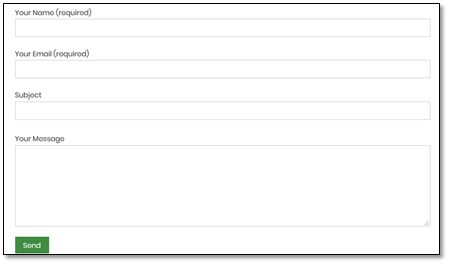
Figure1: Contact Form 7 Honeypot
CIC-honeynet uses T-POT tool outside firewall which is equipped with several tools. T-Pot is based on well-established honeypot daemons which includes IDS and other tools for attack submission.
The idea behind T-Pot is to create a system, which defines the entire TCP network range as well as some important UDP services as a honeypot. It forwards all incoming attack traffic to the best suited honeypot daemons in order to respond and process it. T-Pot includes docker versions of the following honeypots:
Figure 2 demonstrates the network structure of CIC-honeynet and installed security tools. There are two TAPs for capturing network activities. Outside the firewall, there is T-POT which captures the users’ activities through external-TAP. Behind the pfsense firewall in the internal network Security Onion has been used to analyse the captured data through internal-TAP. It is a Linux distro for intrusion detection, network security monitoring, and log management. It’s based on Ubuntu and contains Snort, Suricata, Bro, OSSEC, Sguil, Squert, ELSA, Xplico, NetworkMiner, and other security tools.
In the internal network 3 PCs are running the CIC-Benign behaviour generator (an in house developed agent), includes internet surfing, FTP uploading and downloading, and Emailing activities. Also, four servers include Webserver with WordPress and MySQL, Email Server (Postfix), File Server (Openmediavault) and SSH Server have been installed for different common services. We will change our firewall structure to test different brands every month.
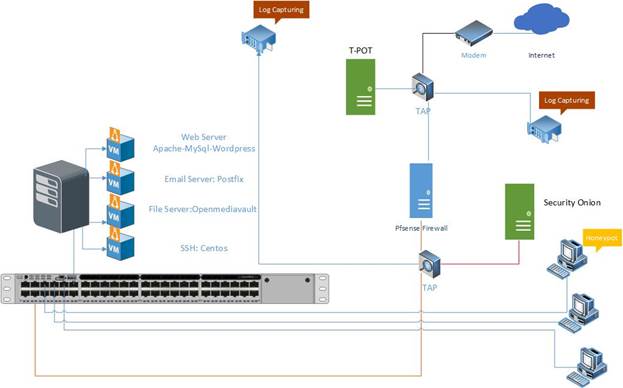
Figure2: Network Diagram
All traffic captured through the internal-TAP and external-TAP and analysis by CICFlowMeter which extracts more than 80 traffic features. The source code of CICFlowMeter is available in GitHub.
Also we used Kippo tools to mimic the SSH command inside the firewall and captures the users commands. Some easy password such as 1234, 123… are entered in Kippo database to make it vulnerable for attackers.
3- T-POT Report (External-TAP)
3.1 login attempts
We analyzed the IP addresses that made login attempts using the T-POT. The top ten countries that we recieved login attempts from are listed in Table 1.
Table1: IP breakdown by country
|
Country |
Number of Attack |
|
Russia |
585148 |
|
China |
151006 |
|
United States |
104779 |
|
Brazil |
69265 |
|
Netherlands |
62995 |
|
Japan |
16167 |
|
Cyprus |
11207 |
|
France |
8937 |
|
Germany |
8738 |
|
Turkey |
8578 |
In Table2, top 10 of source IP address and the number of attack are demonstrated.
Table2: Top 10 Source IP
|
Source IP |
Number of Attack |
|
222.186.174.93 |
80948 |
|
109.248.9.101 |
59243 |
|
109.248.9.102 |
54039 |
|
35.189.97.36 |
42929 |
|
5.188.86.206 |
38754 |
|
61.177.172.234 |
36665 |
|
185.232.30.101 |
31661 |
|
5.188.87.50 |
29627 |
|
109.248.46.99 |
27467 |
In figure3, top 5 of countries are demonstrated by related ports. For example the attacks from Russia have been 48.49% through port 5900, 27.35% through port 2222, 12.59% through port 443, 10.86% through port 25 and 0.71% through port 80.
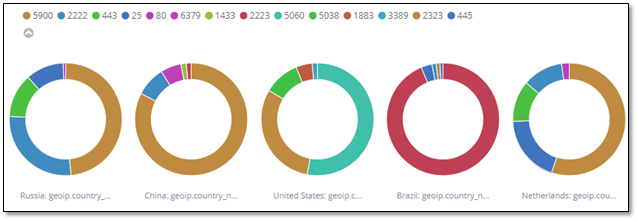
Figure3: Honeypot by country and port
3.1 Webserver and VNC attacks with related CVEs
During this week, we had two CVEs namely, CVE-2003-0567 and CVE-2017-0143 which the number of attacks for each CVE are demonstrated in Table3.
Table3: Top 10 Source IP
|
CVE-ID |
Numbers |
|
CVE-2003-0567 |
52347 |
|
CVE-2017-0143 |
16 |
The location of attackers based on the IPs presented on Figure 4.
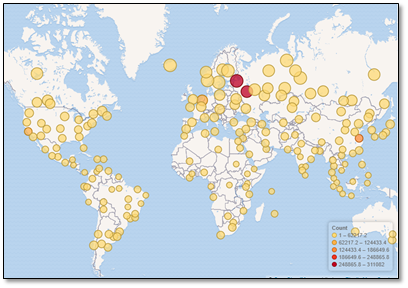
Figure4: The approximate locations of the IP addresses
Based on T-POT the 78.39% of attacks are from addresses with a bad reputation, while only 21.18% are from known attackers (figure5).
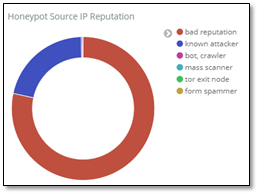
Figure5: External Honeypot source IP Reputation
In Figure 6, some attacks on NGINX webserver have been presented.
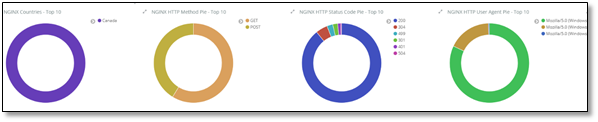
Figure6: attacks on NGINX
The VNC attacks listed in T-POT have been shown in Table 4 which around 149583 of them are from Master-Integration Ltd.
Table4: Top 10 Source IP of VNC attack
|
|
username |
Number of occurrence |
|
|
222.186.174.93 |
80948 |
||
|
185.232.30.101 |
31661 |
||
|
109.248.46.99 |
29556 |
||
|
109.248.46.71 |
27652 |
||
|
109.248.46.113 |
26635 |
||
|
109.248.46.79 |
26606 |
||
|
109.248.46.12 |
26405 |
||
3.3 TOP Username and password for brute force attack
For brute force attacks, attackers most frequently used the usernames and passwords which are listed in table 5 and 6:
Table5: common username used by attackers
|
|
username |
Number of occurrence |
|
|
root |
78358 |
|
|
0 |
69682 |
|
|
admin |
24944 |
|
|
1234 |
19077 |
|
|
enable |
6201 |
|
|
shell |
6158 |
|
|
guest |
3300 |
|
|
supervisor |
2030 |
|
|
default |
1921 |
|
|
user |
1545 |
Table6: common password used by attackers
|
password |
Number of occurrence |
|
|
[blank] |
71914 |
|
|
1234 |
23390 |
|
|
system |
6212 |
|
|
sh |
6158 |
|
|
admin |
3576 |
|
|
12345 |
3364 |
|
|
password |
3301 |
|
|
123456 |
2315 |
|
|
user |
2315 |
|
|
7ujMko0admin |
2180 |
|
3.4 TOP Commands
Table 7 and 8, show the most common commands used by attackers in Cowrie and Mailoney external honeypots. (All commands are available in captured data)
Table7: common command used by attackers grabbed by Cowrie
|
|
command |
Number of occurrence |
|
1 |
export HISTFILE=/dev/null |
69 |
|
2 |
export HISTFILESIZE=0 |
69 |
|
3 |
export HISTSIZE=0 |
69 |
|
4 |
history -n |
69 |
|
5 |
unset HISTORY HISTFILE HISTSAVE HISTZONE HISTORY HISTLOG WATCH |
69 |
|
6 |
unset HISTORY HISTFILE HISTSAVE HISTZONE HISTORY HISTLOG WATCH ; history -n ; export HISTFILE=/dev/null ; export HISTSIZE=0; export HISTFILESIZE=0; |
66 |
|
7 |
/gweerwe323f |
56 |
|
8 |
cat /proc/cpuinfo |
48 |
Table8: common command used by attackers grabbed by Mailoney
|
|
command |
Number of occurrence |
|
1 |
AUTH LOGIN |
443 |
|
2 |
EHLO 205.174.165.74 |
311 |
|
3 |
QUIT |
136 |
|
4 |
HELO mailserver |
122 |
|
5 |
EHLO User |
28 |
|
6 |
DATA |
9 |
|
7 |
RSET |
9 |
|
8 |
HELO *.* |
8 |
|
9 |
STARTTLS |
8 |
|
10 |
AaAaAa |
6 |
4. Internal Honeypot
As we talked in section2, Inside of our network, Security Onion is capturing the number of attacks which is demonstrated in Figure 7. Also we can prove it in Squert and SGUIL which are tools of Security Onion to exactly detect attackers (figure 9, 10, 11, 12). The only difference here is that we intentionally opened some ports on the firewall and when attackers pass the firewall, they face real network. Inside the firewall, as we mentioned in section2, we have 3 PCs and 4 servers for different services. By analysing captured data through Security Onion, we get different result than from section 3.
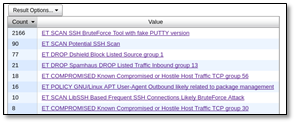
Figure7: Traffic requested by users
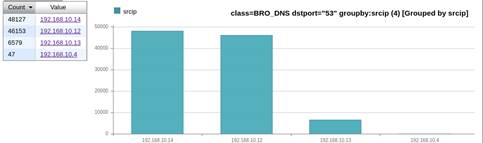
Figure8: users traffic inside network
Inside network, on port 22 we had 4215 attacks which is demonstrated on Figure 9.
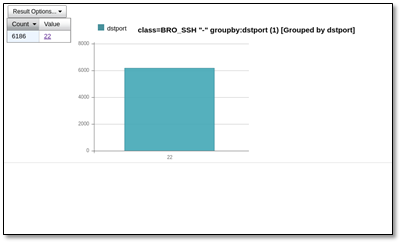

Figure9: Traffic on SSH port
As it is mentioned, we have seen 10% SSH BruteForce attack with fake PUTTY and other protocol of TCP. We didn’t see this kind of attack on external honeypot (T-POT) (figure 10,11,12).
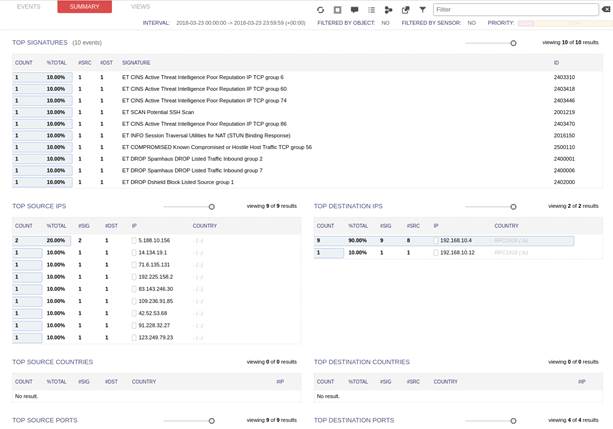
Figure10: Squert summary for attacks
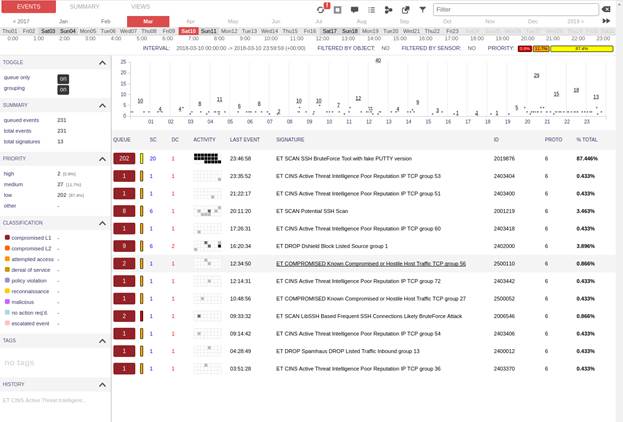
Figure11: Squert shows different attacks on Sat 10th of March
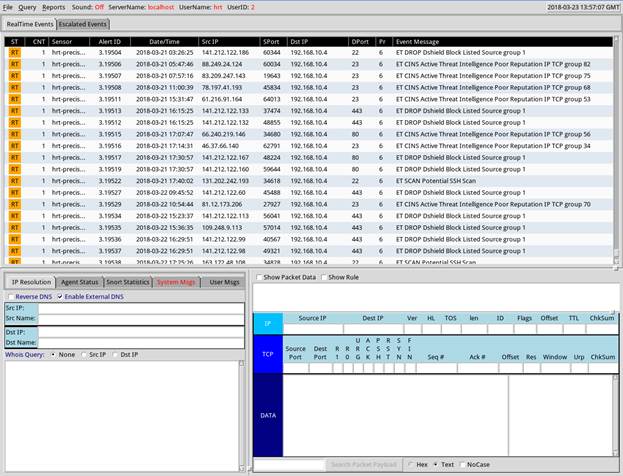
Figure12: attack on SGUIL tools